
If you enable it, the issue will go away. Currently skills / passive views are rendered using webgl (this will be changed eventually) and it uses GPU if hardware acceleration is enabled.
Thanks for the report once again! This issue is fixed.
1 Like
Build planner now shows an indicator ( ) for builds that are at least 2 major patches old.

8 Likes

Virtual beer for Dammit (or the beverage of your choice).
Amazing job.
3 Likes
Good news for people who had issues with high CPU usage!
I’ve updated rendering layer for build planner - it no longer uses webgl which caused issues when hardware acceleration in browser was turned off.
1 Like
Any way to confirm I am using the newer version without webgl?
Still seeing a ~40% CPU spike when opening Skills/Passives… Firefox 98.0.1 Win10. Hardware accelleration on.
Clearing cache doesnt seem to have affected it…
You can open developer console - if you see in logs “PixiJS 6.2.2 - ✰ Canvas”, then it’s a new version.
There still might be spikes in CPU usage, because it’s still rendering, even if it’s canvas and not webgl, there’s a lot of sprites in there. But it shouldn’t be as bad as before. In future I optimize and reduce sprites in size, so that memory footprint and subsequent CPU usage is not that bad, but to be honest there’s just a lot of sprites  You can’t make it look good if spritesheet resolution is decreased.
1 Like
Ok… Yip… confirmed using the PixiJS. Spikes… understood. Sprites… understood… 
Thx alot Dammitt! No more freezes and crashes 
2 Likes
Damn … now thats an update to the site… You are definitely upping the ante here…


1 Like
Reporting a Bug;
The Weapon Hakars Phoenix gives the Sentinel Melee Skill Points, it should only give the Primalist the Points.
Ty for your Tool
Thanks for the report! The issue is fixed now.
Tooltip for skill tree nodes was updated. It’s now more in line with other tooltips and should be more concise and easier to read.
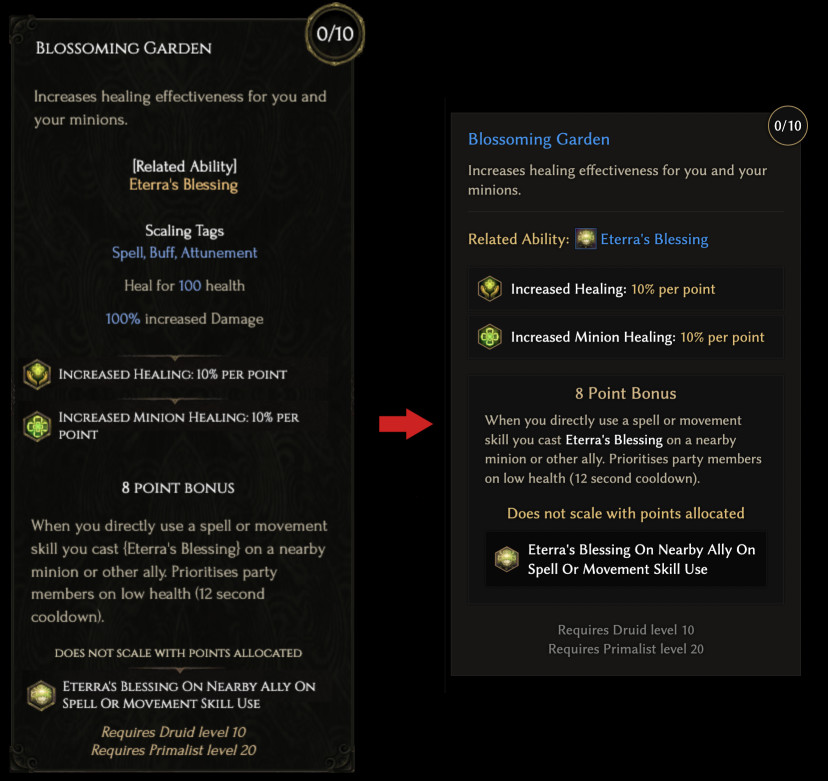
3 Likes
Report a little bug:
Builds using [Plague Bearer’s Staff] unique item (Builds using Plague Bearer's Staff unique item - Last Epoch Builds)
the result isn’t correct.
Thanks for the report! This issue is fixed.
Anyone else having issues with the build planner not bringing up the skills or passives panels at all? The loot filter panel pops up just fine, and changing between the General, Offense, etc. tabs do too, but I can’t get those to work on any browser.
Seems to be working fine on my end - Firefox/Win10…
Maybe try clearing your browser cache?
Clearing my cache via my browser settings didn’t work, but doing it via CCleaner did. Weird, but problem solved.
1 Like
Often i start creating a build, than i wanna lookt for items per itemdatabase, when i hit the button not a new window opens, my actually window goes for it, and i lost my build.
Is it possible that you can do it, that when i wanna hit a button on top, that a new window goes up, or so that i can right click on it and create a new window?
Sometimes i forget it that it happens, and than the build is gone 
Ty very much
Thanks for the report. I’ll try to find a solution for this, but there’s nothing strange in the navigation behavior that you describe. All links are supposed to be opened in current window because it’s expected from any site. Holding [Ctrl] or [Cmd[ button, while clicking on a link, will open it in new window, it’s standard behavior for any website.
The best I can do is one of the following:
- check whether something was changed in build planner and show a warning before leaving the page
- save current build to local storage.
The former would be really annoying for 99% of people, because if I want to test something and change stuff in planner or open someone else’s build and change something, this would lead to such alert to show up even if I don’t expect it to.
The latter would be more difficult to implement, plus it might be annoying as well if I just opened someone else’s build and changed something - this would lead to such build being saved to local storage and opening /planner would result in opening saved build and not an empty one.
I’ll think about it.
3 Likes