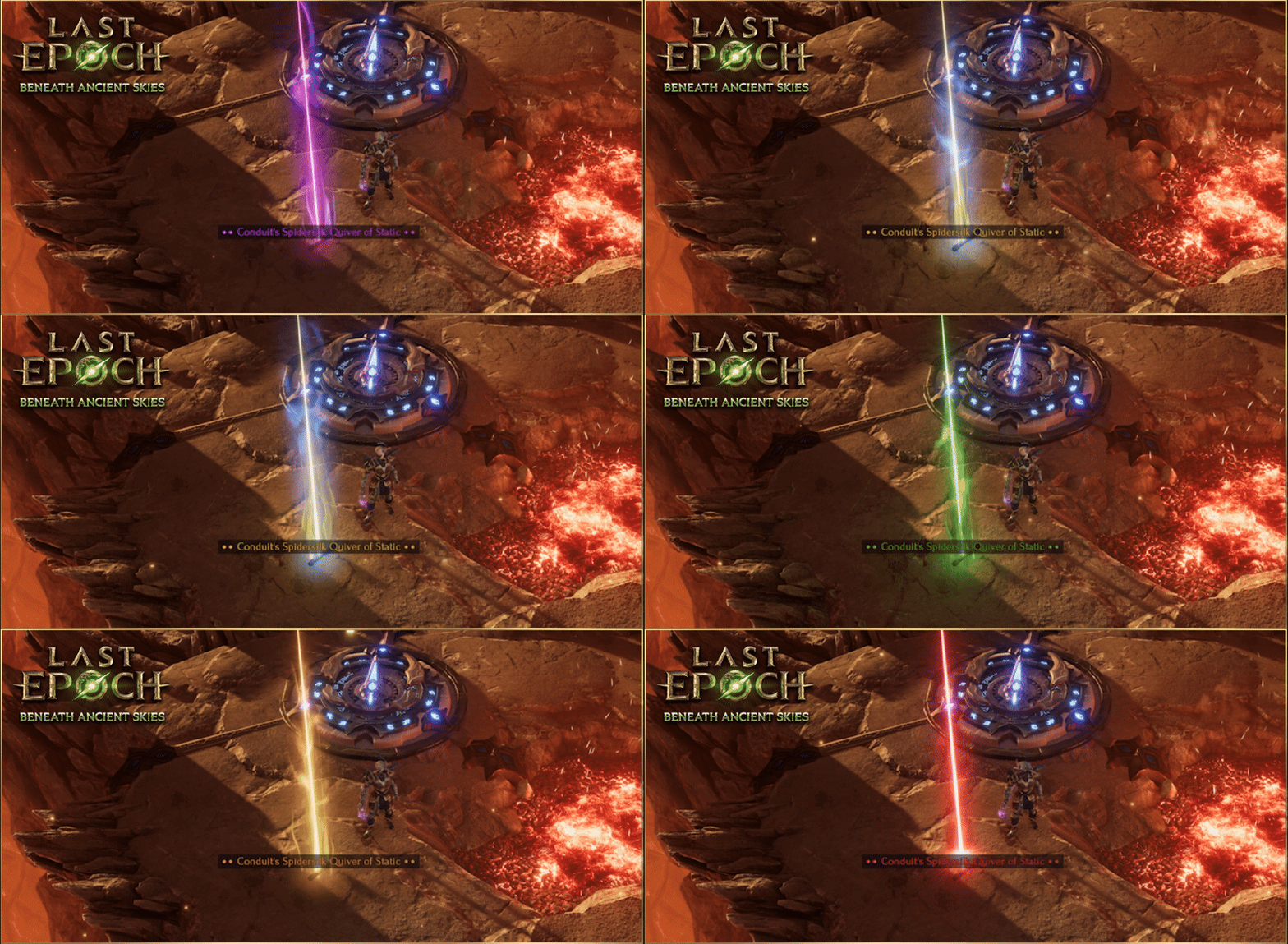
In Loot Filter specified rules, on the bottom left of the new rule filter screen, there is now an option to set a specific beam and a corresponding mini map icon.
Map Icons will match the dominant color of selected beams.
Players may also set a ‘None’ option to display no beam, no map icon, but leave the item ground label in tact.
Beams and Map Icons operate dynamically, and retroactively, for all items dropped.
Caution is advised when setting too broad a filter with custom beams and icons as this can have an adverse effect on performance.
There are now options to select different sounds for loot drops in the Loot Filter menu.
Added support for matching Unique modifier rolls in Loot Filters.
When selecting at least 1 Unique in a Loot Filter that has modifiers with roll ranges, a secondary input will appear that allows specifying min and max values for modifiers of the selected Uniques.
Note for 3rd party tool creators: This is part of lootFilterVersion 5 and replaces UniquesCondition with UniqueModifiersCondition. Any filters on version 4 with UniquesCondition will automatically migrate to use UniqueModifiersCondition when loaded in game.
Any rule that includes a recoloring of item labels will now display the color change in the rule listing by coloring the word “show” at the start of the text of that rule.
Using loot filter conditions with minimum Weaver’s Will or Legendary Potential will now only affect unique items with Weaver’s Will or Legendary Potential respectively instead of all unique items.
Miscellaneous polish for loot filter rule editor UI.
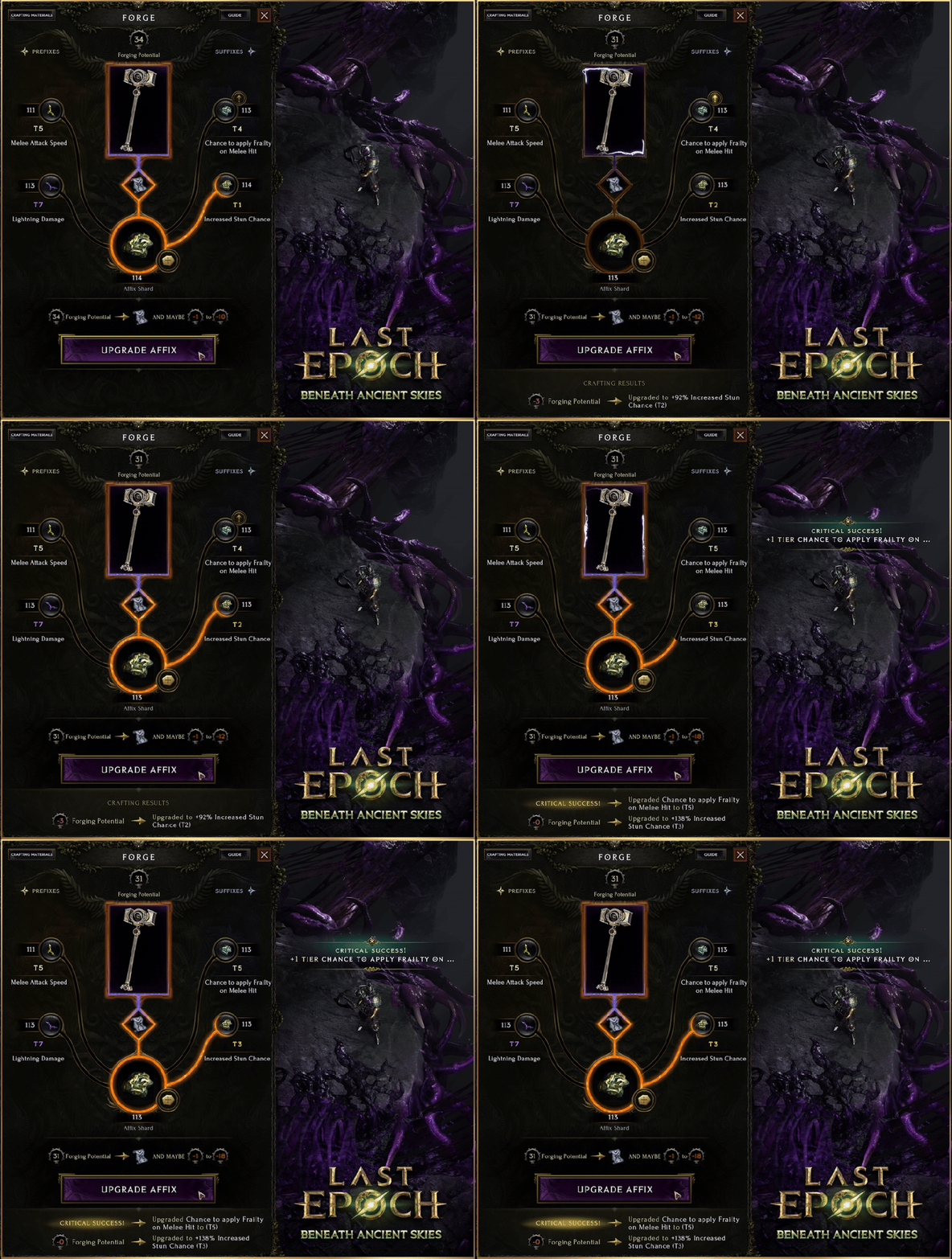
The Forge UI has been adjusted to make crafting costs and results more clear.
Forging Potential and how much Forging Potential the item is going to lose are now shown.
Glyphs that can be consumed are now shown in the UI.
The outcome of a craft will now show the following information:
The added Affix tier and current value of it on the item.
Critical successes and what it has upgraded.
Results from Runes with an explanation of what it did.
Stash Macros
Added SwapAttributes macro.
Updated Relic of the Observer (Oerden’s Watch) to set the macro when opening the stash.
Added PT (potential tier) macro.
Matches items that could be used for unique rerolling in the Gauntlet of Strife.
e.g. WW&PT20+ would match Weaver’s Will items that have 20 or more Weaver’s Will and legendary affix tiers.
Updated Woven Offering to set the potential tier macro when opening the stash
Added affix tier count macros.
These work the same as existing affix tier macros, but instead of matching any affix, they match if at least a certain number of affixes are matching tiers.
Available affix tier counts are 1-5 (1T, 2T, 3T, 4T, 5T).
For example:
T6+ or 1T6+ matches any exalted item (at least 1 affix is tier 6 or higher).
2T7 matches double T7 exalted items (at least 2 affixes are tier 7).
3T6+&T7 matches triple exalted items where at least 1 affix is T7 (e.g. T7/T7/T7 or T7/T6/T6 would both match).
Added WeaverIdol stash search macro that matches weaver idols.
Regex can now be composed into search expressions like it is a macro:
T7&/boots/ to find boots with at least 1 T7 affix.
/relic/&/1[4-6] dexterity/&suffixes1- to find relics with T7 dexterity and at least 1 open suffix.
Added the ability to purchase a duplicate version of a Stash tab through the configuration window.
Player, Minion, and Enemy health-bar settings now each have a corresponding color picker with color vision deficiency aware preset color palettes to choose from.
Added a damage indicator to the edge of the screen when taking damage with a UI open (i.e. when interacting with Nemesis).
Pressing X now also refreshes loot labels on the ground.
Updated the Relic of the Observer crafting station in Oerden’s Watch. It will now reset the affix selection buttons after an item is placed or the craft completes to address edge cases where the visually selected affix was not the affix that was replaced.
Added a new option in the game settings to turn off gold labels below a specified amount of gold.
Increased the character limit in the stash search box and the vertical stash search box from 30 to 255.
Added a notification when you leave an item in the Forge crafting panel.
Updated the notification when item ground tooltips are hidden.
The enter button on the Dungeon entrance panel now no longer allows you to click it when there is no key in the key slot.
Added quick navigation buttons to Faction rank panels when a member of at least 2 factions.
Various UI elements now render correctly on 16:10 aspect ratio displays.
When the Faction menu is opened it now closes any other menu opened on the left, right, or the center of the screen.
Added UI scaling for The Woven Echo crafting system and Weaver Tree.
Updated Ancient Era chapter banner and map tab graphics.
Updated Idol Enchanter stash button to set a search expression of WT|WeaverIdol by default when clicked.
Readded notifications that tell you why you can not equip an item when you attempt to and fail.
Updated the organization of Runes in the Forge based on their uses.
Opening the bug report menu on Keyboard / Mouse layout will now auto focus on the description.
Player movement is now disabled is if any panel is open while using a Controller.
Added controller navigation for the chat window, it’s accessible from the menu wheel on controller (second page).
In the vendor UI when you sell an item with a controller your cursor will move to the next available item instead of defaulting to the now empty slot where the item you sold had been.
You can now click or use LB/RB on a controller to swap between faction panels.
Both the Passive Tree and Skill Tree menus can now be navigated with either the directional pad or the left analog stick.
Adjusted navigation of the character creation screen with a controller to be more intuitive.
Created a new graphics setting to control the amounts of lights emitted by visual effects. Lowering can improve performance on slower configurations. Improves the performance in chaotic battles.
Fixed a common source of hitches during gameplay.
Enabled texture streaming all across all of the games assets for reduced memory usage and improved loading times. The texture quality settings set by the Master Quality option have been adjusted to account for this change. Since the game uses at least 25% less vram with full texture resolution enabled we have lowered the vram requirements:
2gb vram cards can now use the ‘low’ preset.
4gb cards and Steam Decks can now use the medium preset.
6gb cards and up still use the high preset.
Please note that memory usage also depends on the rendering resolution.
Introduced a system that limits numbers and types of visual effect lights based on quality settings to improve performance.
Created a new graphics setting to control the amounts of lights emitted by visual effects. Lowering can improve performance on slower configurations. Improves the performance in chaotic battles.
Adjusted the lighting and shadows in the Haven of Silk to improve performance.
Adjusted vegetation settings in Champions Gate to improve performance.
Optimized visual effects performance on the following enemies:
Titan Leech
Blood Gorgon
Blood Chimera
Blood Serpent
Elder Gaspar Husk
The following menus have had some changes to how they load to optimize their performance and reduce hitches when opened:
Passive Tree Menu
Skill Tree Menu
The Woven Faction Menu
Weaver Faction Tree Menu
Stash Menu
Cosmetics Store Menu
Settings Menu
Reduced framerate hitches when spawning gear and npcs.
Improved game quality for connections with high packet loss.
Most frozen enemies now visually shatter on death. They do not shatter if they’re Erased with Erasing Strike or a similar effect that leaves no corpse, killed with fire or poison damage, or if they’re a boss or another particularly large enemy.
Reduced screenshake on Slaughtered Thrall explosions.
Toned down the Champion visual indicator surrounding the model.
Update Admiral Harton and Harton’s Husk weapon visuals.
Updated sand visuals for abilities used by multiple enemies for improved visibility.
Updated visuals of Cave Spiders.
Reduced Cave Spider’s entrance animation length.
Added outlines to Soul Generators in The Altar of Flesh.
Bitterwing: Updated the visual effects of their breath attack.
Fateweaver Lachesis: Updated its Shocking Fate attack indicator visual.
Cosmetic items on existing characters may need to be re-equipped at the start of Season 3 due to changes to the cosmetics system
Cosmetics can now be used in Offline and True Offline Modes. Players must first access the Appearance panel in either Offline or Online Mode in order to access it in True Offline mode.
The same cosmetic pet can now be equipped in both pet slots.
Added a new cosmetic equip slot for customizing your portal visuals when in a completed Echo.
Both default and Echo completed portal slots can be independently set or cleared.
The same cosmetic portal can be assigned to both portal slots.
The default portal slot uses a blue portal if not using a cosmetic portal.
Echo completed portal slot uses a green portal if not using a cosmetic Portal.
Added a new version of the cosmetic item - Gauntlet of Fury Judgement. Version 2 is not as bright as version 1.